

Payroll for Small Businesses UK: The Complete 2026 Guide
For a UK small business, payroll means correctly paying staff, deducting the right tax and National Insurance, filing Real Time Information with HMRC on or before each payday, and handling workplace pension duties. You can run it yourself using HMRC’s free tool, use paid software such as Sage or Xero, or hand the whole process to a payroll bureau. The right choice depends mostly on your headcount, how complex your pay is, and how much of your own time you want to spend on it.
Key takeaways
- HMRC’s free Basic PAYE Tools works for simple payrolls under 10 employees, but it will not produce proper payslips or assess staff for auto-enrolment.
- Paid software such as Sage, BrightPay, Xero Payroll and QuickBooks Payroll adds payslips, pension handling and support, typically from around £8 to £20 a month for a small team.
- Outsourcing to a payroll bureau often costs less than software once your own time is properly valued, particularly once pay becomes more complex.
- Every option used must be recognised by HMRC to legally file Real Time Information.
- ChatGPT and similar tools cannot run compliant UK payroll, though they can help you understand the process.
What is payroll for a small business?
Payroll is the recurring process of calculating what eac2h employee is owed, deducting Income Tax and National Insurance through PAYE, reporting this to HMRC through Real Time Information, and paying staff correctly and on time. It also covers workplace pension contributions, statutory payments such as sick pay, and year-end documents like the P60.
What Running Payroll for a Small Business Actually Involves
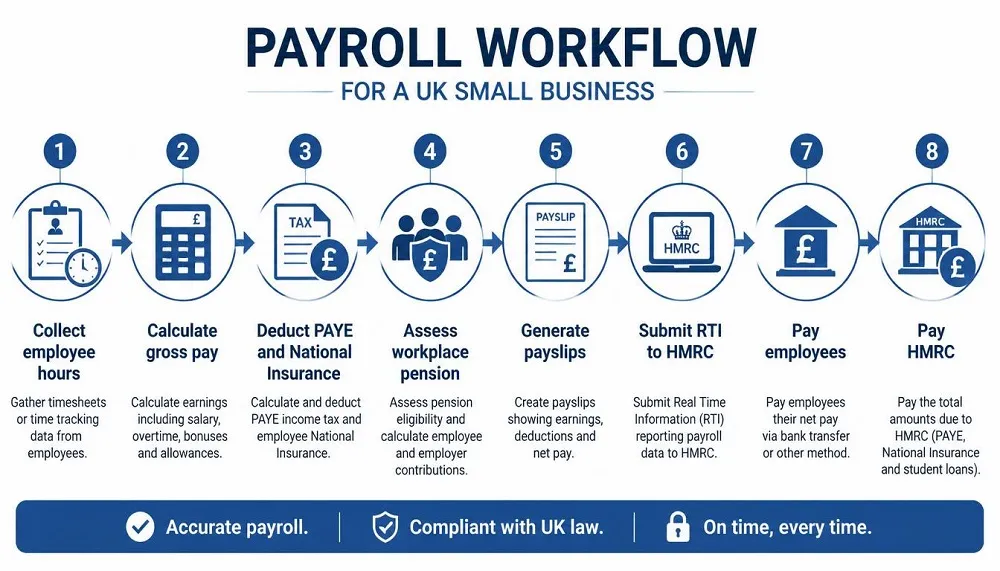
Every payroll cycle involves the same core steps, whatever tool or provider you use. You calculate gross pay, apply the correct tax code, deduct Income Tax and National Insurance, and work out any pension contribution. You then issue a payslip, submit a Full Payment Submission to HMRC on or before payday, and pay HMRC monthly or quarterly depending on the size of your payroll. At the end of the tax year, employees need a P60, and anyone who leaves during the year needs a P45.
If you have not yet registered as an employer with HMRC or worked out the true cost of taking on staff, our guide to hiring your first employee in the UK covers registration, contracts and the full cost breakdown in detail, so this guide focuses on running payroll once that groundwork is in place.
What You Need Before Your First Pay Run
You will need your PAYE reference from HMRC, each employee’s tax code and National Insurance number, their bank details, and a decision on pay frequency, whether that is weekly, fortnightly or monthly. Getting this in place before your first payday avoids the most common early mistakes.
DIY, Software, or Outsourced: Choosing How to Run Payroll
The decision that matters most is not which product to buy, but which of three routes suits your business: doing it yourself with a free tool, using paid software, or outsourcing to a bureau. Each has a genuinely different cost, time and risk profile.
| Route | Best for | Typical cost | Time required | Compliance risk |
|---|---|---|---|---|
| DIY (HMRC Basic PAYE Tools) | Single director or under 10 staff, simple pay | Free | Low per run, but manual | Higher if used incorrectly |
| Payroll software | Small teams needing payslips and pension handling | Around £8 to £20 a month | Low once set up | Low, if kept up to date |
| Outsourced bureau | Complex pay, growing teams, limited time | Custom pricing, often monthly per head | Minimal | Lowest, provider carries the process |
When DIY Makes Sense
A single director on a fixed salary, or a very small business with straightforward pay and no eligible staff for auto-enrolment, can often manage with HMRC’s free tool. It keeps you legally compliant at no cost, provided your situation stays simple.
When Paid Software Makes Sense
Once you have more than a handful of staff, variable hours, or anyone eligible for a workplace pension, dedicated software earns its cost quickly through proper payslips, automated pension assessment and fewer manual errors.
When Outsourcing Makes Sense
If payroll is taking hours out of your month, or the stakes of getting it wrong feel high, a bureau removes the task completely. The fair comparison is not software price against bureau price, it is software price plus your own time against what a provider charges to do the whole job correctly.
Best Payroll Software for Small Businesses UK
Good UK payroll software should file Real Time Information automatically, calculate PAYE and National Insurance correctly, handle auto-enrolment, and produce proper payslips and year-end documents. Before comparing products on price, check that a tool actually covers these basics well.
Only use software that appears on HMRC’s official list of recognised payroll software, since filing Real Time Information through a recognised product is a legal requirement for every UK employer, not an optional extra.
| Software | Standalone? | Auto-enrolment | Indicative monthly cost (2026) |
|---|---|---|---|
| Sage Payroll | Yes | Yes | From around £10 for up to five staff |
| BrightPay | Yes | Strong, cloud moving from desktop | From around £99 a year, or per employee on cloud |
| Xero Payroll | No, needs Xero accounting | Yes | Around £1.50 per employee plus your Xero plan |
| QuickBooks Payroll | No, needs QuickBooks | Yes | From around £5 plus a per-employee charge |
| HMRC Basic PAYE Tools | Yes | No assessment | Free |
Sage and BrightPay work as standalone tools without needing any other software, which suits a business that has not already committed to an accounting platform. Xero and QuickBooks payroll only make sense if you already run your books on that platform, since buying the accounting software purely for payroll access rarely pays off.
Free Payroll Software for Small Businesses UK
HMRC’s Basic PAYE Tools is the main genuinely free, fully compliant option. It calculates tax and National Insurance, files Real Time Information, and records employee details at no cost. What it does not do is produce proper printable payslips beyond a basic format, assess staff for workplace pension auto-enrolment, or handle more complex statutory scenarios smoothly.
A handful of commercial tools also offer free tiers for the smallest employers, though these usually come with limits on employee numbers or features once your business grows. Free is rarely the whole story. A tool that costs nothing but takes two hours every pay run is not really free once your own time is accounted for, which is worth remembering before choosing purely on price.
Payroll Services for Small Business UK: Outsourcing Explained
A payroll bureau takes over the entire cycle on your behalf. That typically means calculating pay, filing Real Time Information, managing pension contributions, producing payslips, and handling starters, leavers and statutory pay, all without you touching the software directly.
What a Bureau Actually Does For You
Beyond running the numbers, a good bureau keeps you informed of upcoming deadlines, flags when an employee becomes eligible for auto-enrolment, and manages year-end documents automatically. You send hours or salary changes each month, and the rest is handled.
Typical Cost of Outsourced Payroll
Pricing for outsourced payroll varies significantly by provider and headcount, and most bureaus quote custom pricing rather than a fixed public rate, which makes direct comparison harder than with software. As a general guide, expect a base monthly fee plus a charge per employee, with the total often working out competitive against paid software once your own time running it is priced in. Always ask for a written quote covering your actual headcount before assuming a figure applies to your business.
Bureau vs Accountant-Run Payroll
Many bookkeeping and accountancy firms bundle payroll processing alongside their other services, which can be convenient if you already use one for your books. Our guide to bookkeeping services in the UK covers pricing and provider types for that side of your finances in detail, including where payroll typically sits as an add-on.
Best Payroll Provider for Small Businesses in the UK
There is no single best payroll provider for every UK small business, because the right choice depends on your headcount, complexity and existing software. What matters is matching the provider type to your actual situation rather than picking whatever ranks first in a generic list.
Best Option By Business Situation
| Your situation | Recommended route |
|---|---|
| Single director, fixed salary | HMRC Basic PAYE Tools or a low-cost tool |
| Small team, no accounting software yet | Standalone software such as Sage |
| Several staff eligible for auto-enrolment | Software with strong pension handling, such as BrightPay |
| Already using Xero for accounts | Xero Payroll add-on |
| Already using QuickBooks for accounts | QuickBooks Payroll add-on |
| Payroll is taking up too much of your time | An outsourced payroll bureau |
Which Payroll System Is Best for Small Businesses?
The best system genuinely depends on business size, so it is worth thinking in three rough bands rather than searching for one universal answer.
Matching System Type to Business Size
A sole trader or single-director company with fixed pay usually needs the least, and can often use a free or low-cost tool comfortably. A small team of two to ten staff, particularly with any variable hours or pension duties, generally benefits from paid standalone software. A growing SME with ten or more staff, multiple pay rates or complex statutory pay tends to outgrow basic software and either needs a fuller-featured product or outsourced support.
If you have not yet settled on how your business is structured, our guide to UK business structures explains how sole trader, partnership and limited company status affect your wider obligations, including payroll.
Payroll for Small Businesses UK: Reviews and Ratings
Reviews matter for payroll because you are trusting a provider with sensitive financial data and a legal compliance duty, so it is worth knowing how to read them properly rather than taking star ratings at face value.
How to Read Payroll Provider Reviews Properly
Independent platforms such as Trustpilot, Capterra and G2 give a clearer picture than testimonials published on a provider’s own website, since third-party platforms cannot filter out negative feedback. Look at the volume of reviews behind a score, not just the number itself, since a high rating from a handful of reviews carries far less weight than a similar score across thousands.
What Reviewers Consistently Flag
Across independent reviews of UK payroll providers, the recurring themes are response times during setup, how clearly pricing is communicated after any introductory discount ends, and how well auto-enrolment is handled. Providers that score well tend to be praised for proactive deadline reminders, while common complaints centre on unexpected price increases after a first-year discount and slow support during busy periods such as tax year end.
Payroll for Small Businesses UK Login: Where to Access Your Payroll
Payroll login confusion usually comes from mixing up two separate systems, so it helps to be clear on which one you actually need.
HMRC PAYE Online Login
HMRC PAYE Online is the government portal where you view your employer’s PAYE liabilities, check submissions and manage your employer record. This is separate from Basic PAYE Tools, which is the free software you install to actually calculate and file payroll. You access PAYE Online through your Government Gateway account on GOV.UK.
Logging Into Payroll Software Portals
If you use commercial software such as Sage, Xero, QuickBooks or BrightPay, you log in directly through that provider’s own website or app rather than through HMRC. Each platform issues its own account details when you sign up, separate from your Government Gateway login, so keep a clear record of which credentials belong to which system.
Where do I log in to run payroll for my small business? If you use HMRC’s free tool, you access it through the software installed on your computer alongside your Government Gateway account for PAYE Online. If you use commercial payroll software, you log in directly through that provider’s own portal or app, not through HMRC.
Can ChatGPT Do Payroll?
No. ChatGPT cannot run payroll for a UK small business. It cannot file Real Time Information with HMRC, it does not appear on HMRC’s list of recognised payroll software, and it cannot be held accountable if a calculation is wrong. Running payroll still requires HMRC-recognised software or a payroll provider.
What AI Tools Can Help With
ChatGPT and similar tools can be genuinely useful for understanding payroll concepts, drafting an internal payroll policy, or sense-checking a calculation before you rely on proper software to file it. It can explain what a term like auto-enrolment means, or help you write a starter checklist for new hires.
Why It Cannot Replace Compliant Payroll Software
Tax rates, National Insurance thresholds and pension rules change every tax year, and there is no guarantee that a general AI tool has the current figures or applies them correctly to your specific situation. More importantly, only HMRC-recognised software can actually submit Real Time Information on your behalf, which is a legal requirement, not a preference.
Where AI Realistically Fits In
Think of AI as a research assistant sitting alongside your payroll software or provider, not a replacement for either. It can help you understand what your software is doing or draft supporting policies, while the actual pay run still needs to go through a recognised system.
Payroll Costs for a Small Business UK: What to Budget For
Payroll costs range from nothing to a few hundred pounds a year for software, or a custom monthly fee for outsourcing, depending on your headcount and how you choose to run it.
| Route | Typical monthly cost | Best for | What is often not included |
|---|---|---|---|
| HMRC Basic PAYE Tools | Free | Single director, under 10 staff | Proper payslips, pension assessment |
| Standalone software (Sage, BrightPay) | £10 to £30 | Small teams wanting full features | Support tier upgrades, extra modules |
| Accounting add-on (Xero, QuickBooks) | £5 to £15 plus per employee | Businesses already on that platform | The base accounting subscription itself |
| Outsourced bureau | Custom, often per employee | Complex pay or limited time | Setup fees, one-off catch-up work |
Hidden Costs to Watch For
Introductory discounts on paid software can be substantial, sometimes cutting the first-year price dramatically, so always check the standard rate that applies from year two. Per-employee pricing means costs climb as you hire, which is worth modelling if you expect to grow. The most overlooked cost is your own time, since a cheap tool that takes hours each month is often more expensive in practice than it first appears.
Common Payroll Mistakes UK Small Businesses Make
Most payroll problems come from process, not from the software itself.
Compliance Mistakes
Missing an RTI deadline because nobody ran the pay cycle on time is one of the most common and costly errors, since penalties start at £100 a month and rise with payroll size. Skipping or misjudging auto-enrolment assessment is another frequent slip, particularly as staff cross earnings thresholds partway through the year.
Process Mistakes
Relying on one person with no backup plan leaves a business exposed if that person is unavailable during a pay run. Poor record keeping, especially around starters and leavers, causes confusion at year-end. If you also manage wider HMRC obligations, our guide to the HMRC Business Tax Account explains how to access and manage your broader employer record alongside payroll.
Frequently Asked Questions
Do I need payroll software if I only have one employee?
Not necessarily. A single director on a fixed salary can often use HMRC’s free Basic PAYE Tools to stay compliant, though many still choose paid software once pension duties apply.
Is free payroll software HMRC compliant?
Yes, HMRC’s own Basic PAYE Tools is free and fully recognised for filing Real Time Information for businesses with fewer than 10 employees. It is more limited than paid tools around payslips and auto-enrolment.
What is the difference between payroll software and a payroll service?
Software is a tool you use yourself to run payroll in-house. A payroll service, or bureau, runs the whole process on your behalf, so you send details and they handle calculations, filing and payslips.
How much does payroll cost for a small business in the UK?
Costs range from free with HMRC’s own tool to around £10 to £30 a month for standalone software, or a custom monthly fee for an outsourced bureau, depending on headcount and complexity.
What happens if I file payroll late to HMRC?
Late Real Time Information submissions attract penalties starting at £100 a month, increasing with the size of your payroll, alongside possible interest on late-paid PAYE and National Insurance.
Can I switch payroll provider partway through the tax year?
Yes. Most switches happen cleanly at the end of a tax month, with your new provider or software importing year-to-date figures so employee records stay accurate.
Do I need payroll software for a single-director limited company?
It depends on complexity. A director paying themselves a fixed salary can often manage with a free tool, though many still choose low-cost software for cleaner payslips and easier year-end reporting.
Final Thought
Payroll for a small business in the UK comes down to matching the right tool to your actual situation rather than chasing whatever ranks as best overall. A single director with simple pay rarely needs more than HMRC’s free tool, a small growing team usually benefits from paid software with proper pension handling, and a business where payroll is eating into valuable time is often better served by outsourcing the whole process. Whichever route you choose, make sure it is HMRC-recognised, keep your records tidy, and revisit the decision as your headcount and pay complexity change.